BGP with BFD on EVE-NG with CSR1000v
BFD (Bi-Directional Forwarding Detection) is a fast protocol to detect link failures within milliseconds or microseconds.
Routing protocols have mechanisms to detect link failures via HELLO packets, but they are not fast enough for technologies like VoIP. For example, you can tune OSPF to use a dead interval of one second — still too high for voice traffic.
BFD runs independent of the routing protocol.
Once BFD is up, other routing protocols can leverage it for fast convergence.
BFD is not active until it is referenced by a protocol.
Once BFD stops receiving packets from a peer, it notifies the protocol using it — which is faster than waiting for the protocol’s native dead timer to expire.
BFD Modes of Operation
Asynchronous Mode: Similar to Hello/Holddown timers — when BFD does not receive a set number of packets, the session is torn down.Demand Mode: Once BFD has found a neighbor, it stops sending continuous packets and uses only a polling mechanism (for example, monitoring interface rx/tx). Neither Cisco nor any other major vendor supports this mode currently.
Both modes support echo mode, in which a device sends an echo packet and the peer forwards it back without processing it. If the sender does not receive the echo, the neighborship is torn down.
BFD is essentially a keepalive system that uses UDP and CEF. Originally, BFD was designed for directly connected peers.
BFD can use two types of packets:
- ECHO — Echo packets came later and are not processed by the CPU.
- CONTROL — Processed by the CPU.
ECHO mode is on by default. ECHO packets are encapsulated in UDP.
Echo packets travel between interfaces; a lost echo packet triggers a notification to the upper-level process.
Echo packets are not processed by the CPU, but control packets are.
How BFD performs ECHO without involving the CPU:
The BFD echo packet contains the sender’s IP and MAC in both the source and destination fields. When the packet reaches the directly connected device (which has CEF enabled), CEF forwards it back to the sender without CPU involvement.
You can disable echo mode, though this is generally not recommended — relying solely on control packets increases CPU load.
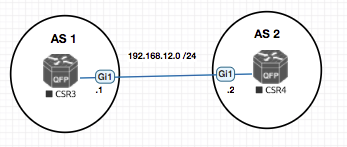
BFD is initially configured on the interface:
bfd interval 100 min_rx 200 multiplier 3
- First value (interval): Send BFD echo packets every 100 ms.
- Second value (min_rx): The fastest this device can process incoming BFD echo packets is every 200 ms — do not send faster than that.
From Cisco Documentation
[no] bfd interval <50-999> min_rx <1-999> multiplier <3-50>
interval: Determines how frequently (in milliseconds) BFD packets will be sent to BFD peers.min_rx: Determines how frequently (in milliseconds) BFD packets will be expected to be received from BFD peersmultiplier: The number of consecutive BFD packets which must be missed from a BFD peer before declaring that peer unavailable, and informing the higher-layer protocols of the failure.
| R1 | R2 |
|---|---|
bfd interval 100 min_rx 200 multiplier 3 |
bfd interval 300 min_rx 75 multiplier 4 |
-
R1advertisesmin_rxas 200 ms.R2was planning to send every 300 ms, but adjusts down to match: it will now send every 200 ms. With a multiplier of4, ifR2does not receive a packet within 4 × 200 ms (800 ms), it tears down the session. -
R2advertisesmin_rxas 75 ms.R1was planning to send every 100 ms, but adjusts down to 75 ms. With a multiplier of3, ifR1does not receive a packet within 3 × 75 ms (225 ms), it tears down the session.
In summary: your
min_rxvalue controls how fast your neighbor sends packets to you.
CSR3#show running-config int gi1
Building configuration...

Current configuration : 141 bytes
!
interface GigabitEthernet1
 ip address 192.168.12.1 255.255.255.0
 bfd interval 50 min_rx 50 multiplier 3
end

CSR3#show running-config | sec bgp
router bgp 1
 timers bgp 10 11 10
 neighbor 192.168.12.2 remote-as 2
 neighbor 192.168.12.2 fall-over bfd
CSR4#show running-config int gi1
Building configuration...

Current configuration : 131 bytes
!
interface GigabitEthernet1
 ip address 192.168.12.2 255.255.255.0
 negotiation auto
 bfd interval 50 min_rx 50 multiplier 3
end

CSR4#show running-config | sec bgp
router bgp 2
 timers bgp 10 11 10
 neighbor 192.168.12.1 remote-as 1
 neighbor 192.168.12.1 fall-over bfd

CSR4(config-router)#
*Mar 30 21:19:31.028: %BFD-6-BFD_SESS_CREATED: BFD-SYSLOG: bfd_session_created, neigh 192.168.12.1 proc:BGP, idb:GigabitEthernet1 handle:1 act
*Mar 30 21:19:31.147: %BFDFSM-6-BFD_SESS_UP: BFD-SYSLOG: BFD session ld:4097 handle:1 is going UP
*Mar 30 21:19:41.187: %SYS-5-CONFIG_I: Configured from console by console
*Mar 30 21:19:46.680: %BFDFSM-6-BFD_SESS_DOWN: BFD-SYSLOG: BFD session ld:4097 handle:1,is going Down Reason: ECHO FAILURE
*Mar 30 21:19:46.682: %BGP-5-NBR_RESET: Neighbor 192.168.12.1 reset (BFD adjacency down)
*Mar 30 21:19:46.682: %BGP-5-ADJCHANGE: neighbor 192.168.12.1 Down BFD adjacency down
*Mar 30 21:19:46.682: %BGP_SESSION-5-ADJCHANGE: neighbor 192.168.12.1 IPv4 Unicast topology base removed from session  BFD adjacency down
*Mar 30 21:19:46.683: %BFD-6-BFD_SESS_DESTROYED: BFD-SYSLOG: bfd_session_destroyed,  ld:4097 neigh proc:BGP, handle:1 act
For example if you have configured the BFD timers as 100msecs with multiplier as 3 so that BFD session will go down if the device did not get response within 300 msecs For the Voice network we need to have less 200 ms delay in the network otherwise the voice communication will break. Please consult with your ISP while setting up BFD with them.