
This content is based on
2018 AWS Federated Authentication with Active Directory Federation Services (AD FS) https://aws.amazon.com/blogs/security/aws-federated-authentication-with-active-directory-federation-services-ad-fs/
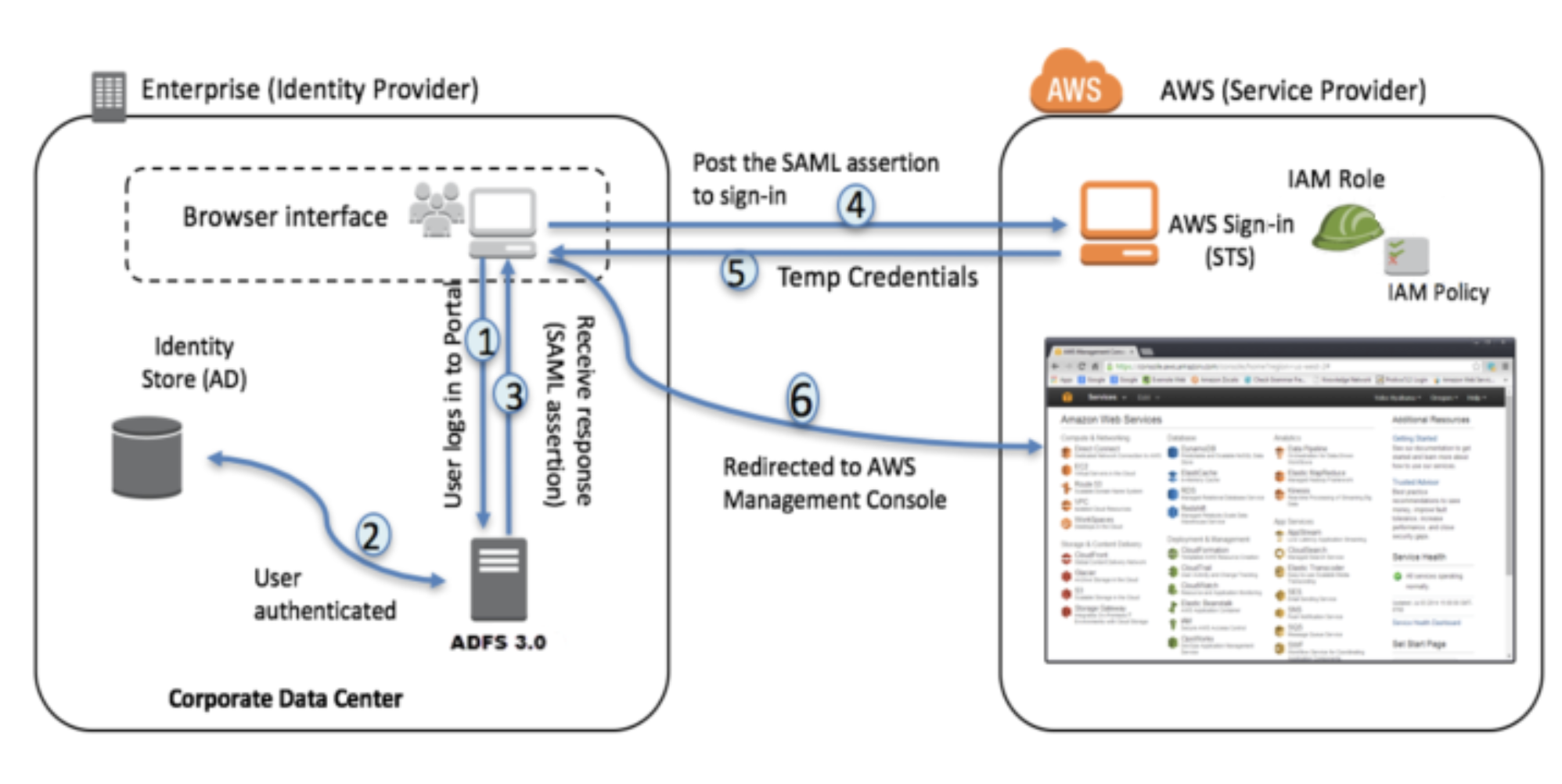
- Corporate user accesses the corporate Active Directory Federation Services portal sign-in page and provides Active Directory authentication credentials.
- AD FS authenticates the user against Active Directory.
- Active Directory returns the user’s information, including AD group membership information.
- AD FS dynamically builds ARNs by using Active Directory group memberships for the IAM roles and user attributes for the AWS account IDs, and sends a signed assertion to the users browser with a redirect to post the assertion to AWS STS.
- Temporary credentials are returned using STS
AssumeRoleWithSAML. - The user is authenticated and provided access to the AWS management console.
Install the Required Services
- Install the following Windows Server roles:
Active Directory Domain Services,Active Directory Federation Services,DNS, andIIS.
Install Active Directory
- Setup : AD for the name
devopssimplified.com - Restart the Computer
Configure Basic Active Directory
-
Create Group :
AWS-3443243287102-ADFS-AD-DevOps-Prod— This naming convention follows AWS best practices documented in the referenced AWS blog post. -
Create User : bob@devopssimplified.com and add to the group above
- Make sure email address is set
ADFS Configuration Preparation
While we are here we configure the user required for ADFS Services
- Create user:
adfssvc— this service account is used by the ADFS service. - Run
setspn -a host/localhost adfssvcto avoid an SPN-related error during ADFS configuration.
Now lets Configure a Self Signed Cert
- Go to
IIS Configuration - Create self signed certificate
webcert - Export it to the desktop
Configuring the ADFS Service
webcert |
WebHosting in the menu . |
Configuring Trust Relation ship and SAML
Now go to ADFS managment Console (To setup trust from AD side)
Step 1
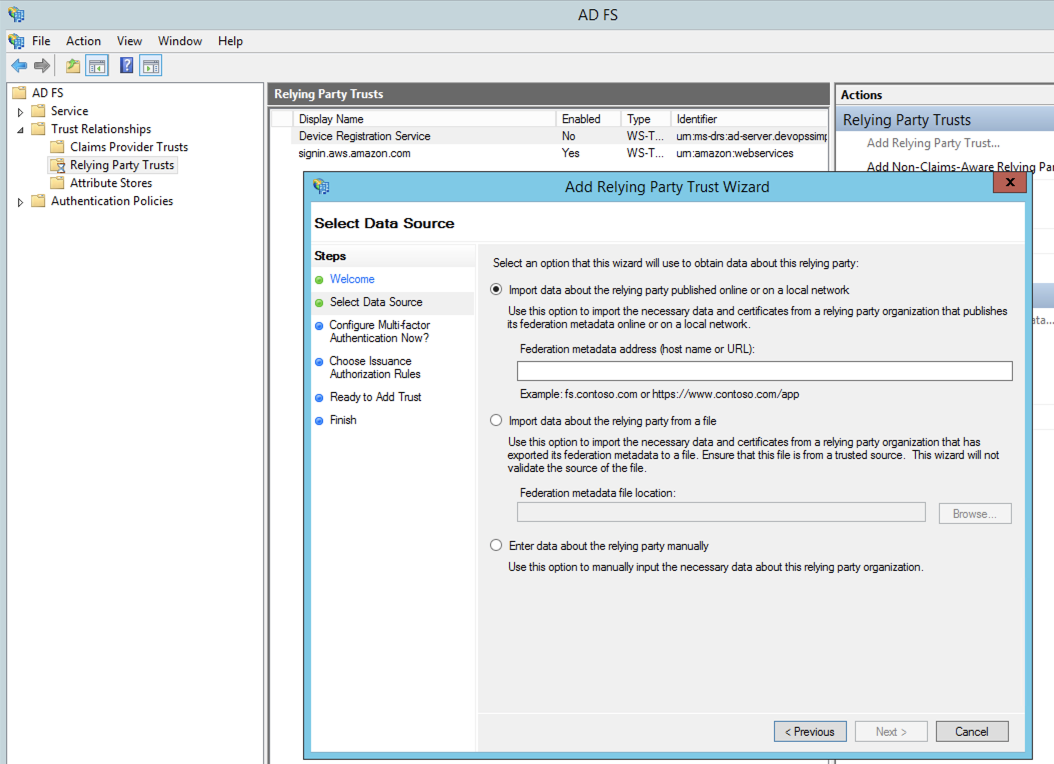 Download the File from https://signin.aws.amazon.com/static/saml-metadata.xml
Step 2
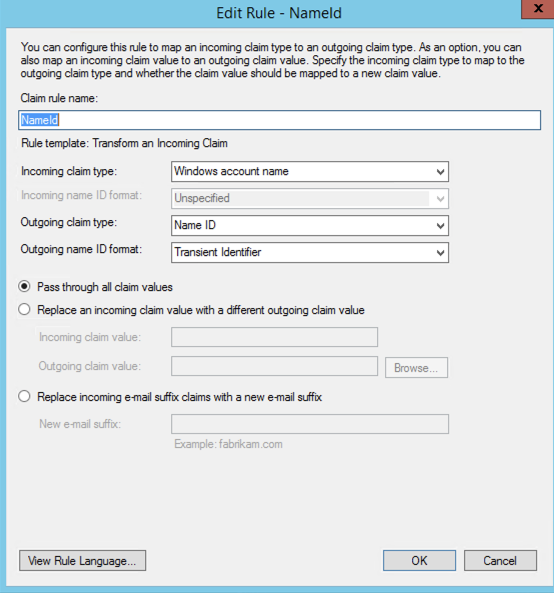
Step 3
https://aws.amazon.com/SAML/Attributes/RoleSessionName
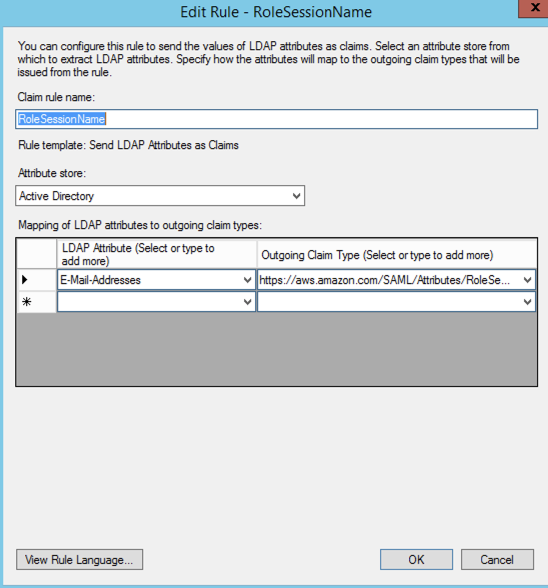
Step 4
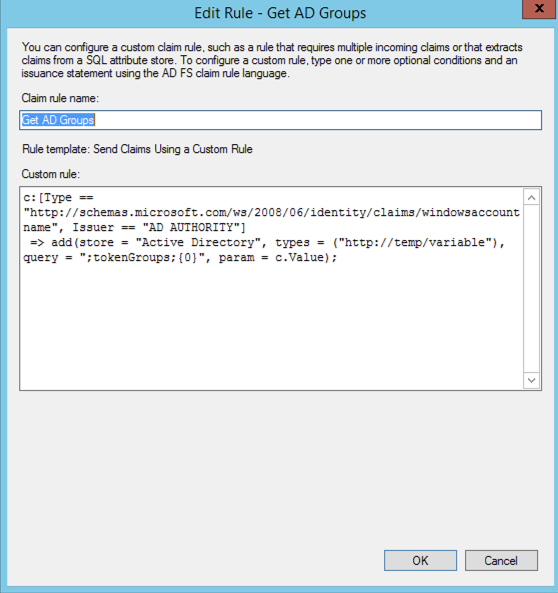
c:[Type == "http://schemas.microsoft.com/ws/2008/06/identity/claims/windowsaccountname", Issuer == "AD AUTHORITY"]
 => add(store = "Active Directory", types = ("http://temp/variable"), query = ";tokenGroups;{0}", param = c.Value);
Step 5
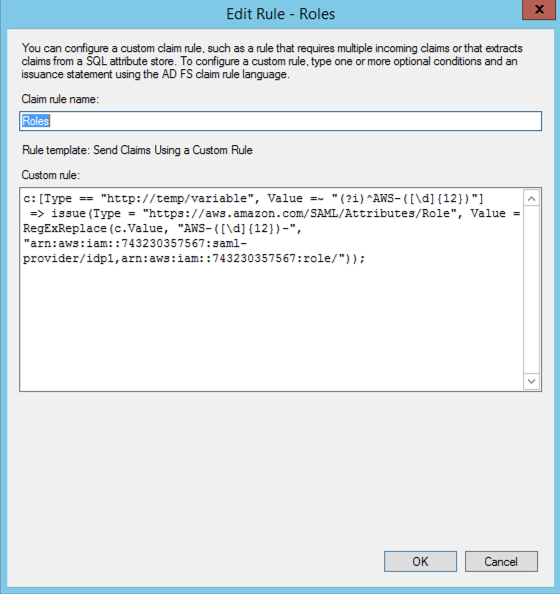
c:[Type == "http://temp/variable", Value =~ "(?i)^AWS-([\d]{12})"]
 => issue(Type = "https://aws.amazon.com/SAML/Attributes/Role", Value = RegExReplace(c.Value, "AWS-([\d]{12})-", "arn:aws:iam::743230357567:saml-provider/idp1,arn:aws:iam::743230357567:role/"));
Trust relationship from AWS Side
Go to AD and download https://localhost/federationmetadata/2007-06/federationmetadata.xml
Import this file in AWS, Name it idp1
- Named
idp1to match the referenced AWS guide.
IAM → Identity Providers → Create Provider → SAML
Create a SAML Role in AWS IAM
ADFS-AWS-Admin
Verification / SAML Tracer
Now login to ADFS Single Sign on on URL
https://localhost/adfs/ls/idpinitiatedsignon.aspx
Good Working SAML Response
<samlp:Response xmlns:samlp="urn:oasis:names:tc:SAML:2.0:protocol"
                ID="_6a302b8d-303c-4498-86dc-27112ccb0c3b"
                Version="2.0"
                IssueInstant="2019-11-25T07:02:13.056Z"
                Destination="https://signin.aws.amazon.com/saml"
                Consent="urn:oasis:names:tc:SAML:2.0:consent:unspecified"
                >
    <Issuer xmlns="urn:oasis:names:tc:SAML:2.0:assertion">http://ad-server.devopssimplified.com/adfs/services/trust</Issuer>
    <samlp:Status>
        <samlp:StatusCode Value="urn:oasis:names:tc:SAML:2.0:status:Success" />
    </samlp:Status>
    <Assertion xmlns="urn:oasis:names:tc:SAML:2.0:assertion"
               ID="_5399b751-bddf-4f2a-806f-245589d4fc7b"
               IssueInstant="2019-11-25T07:02:13.055Z"
               Version="2.0"
               >
        <Issuer>http://ad-server.devopssimplified.com/adfs/services/trust</Issuer>
        <ds:Signature xmlns:ds="http://www.w3.org/2000/09/xmldsig#">
            <ds:SignedInfo>
                <ds:CanonicalizationMethod Algorithm="http://www.w3.org/2001/10/xml-exc-c14n#" />
                <ds:SignatureMethod Algorithm="http://www.w3.org/2001/04/xmldsig-more#rsa-sha256" />
                <ds:Reference URI="#_5399b751-bddf-4f2a-806f-245589d4fc7b">
                    <ds:Transforms>
                        <ds:Transform Algorithm="http://www.w3.org/2000/09/xmldsig#enveloped-signature" />
                        <ds:Transform Algorithm="http://www.w3.org/2001/10/xml-exc-c14n#" />
                    </ds:Transforms>
                    <ds:DigestMethod Algorithm="http://www.w3.org/2001/04/xmlenc#sha256" />
                    <ds:DigestValue>dmBvdXODcozeo4BL3CsOh8E3vm0Ps0blwzzMDBUCbr4=</ds:DigestValue>
                </ds:Reference>
            </ds:SignedInfo>
            <ds:SignatureValue>GlmrHkPuNlvWrjbas00vHl9B5BiUs22WSr5sFRRqzmAeFT9cZ8SbA2yQZg+BvMCO6aS2lAt8Qty0NJR6CIeY3QX0JbTwlal4YnRHaGhN+EEJWjFTXShNaBAwHssLiKbSLPnvtnU9O1Tzgu0UKhuPHySFDVoy8Qtcc4YqfVkXPyCeKS8v8dNMVjgns+Dxmdt5cW+OLxYOa8TiZOvEOqa6C8VW0EDsokX74+rCaRMOremGMLftYQ4bouyGM6JsjBMdoXlZ5TzuMtIdAgyk+nBEkXdwNrAYY1Gbu/BWLBjF9l4CPVrcrrtCV2X/+N4OomvSHIKMtZ0UP5LgkgD/hW5BuQ==</ds:SignatureValue>
            <KeyInfo xmlns="http://www.w3.org/2000/09/xmldsig#">
                <ds:X509Data>
                    <ds:X509Certificate>MIIC+DCCAeCgAwIBAgIQbXeQtdTwvb5GKTpJe94/bTANBgkqhkiG9w0BAQsFADA4MTYwNAYDVQQDEy1BREZTIFNpZ25pbmcgLSBhZC1zZXJ2ZXIuZGV2b3Bzc2ltcGxpZmllZC5jb20wHhcNMTkxMTI1MDUzNDMzWhcNMjAxMTI0MDUzNDMzWjA4MTYwNAYDVQQDEy1BREZTIFNpZ25pbmcgLSBhZC1zZXJ2ZXIuZGV2b3Bzc2ltcGxpZmllZC5jb20wggEiMA0GCSqGSIb3DQEBAQUAA4IBDwAwggEKAoIBAQDTkYyWsE06YfrglQjazfs4tz8MjmEvMOPdpj/rJSKM/UstLDYRcMybjm8DsuiE36/ZRumj9DQUD60hacFfcmoYVthpHh9LZN4ifPpTe6XR7z8bMkplBt2oXTFjy+lLx3jN7kP6YlrxBrAIBM1HTWL0FEhfKtR3PKrGA8/EDbxkq9WyIxbx5c0cugr4N5fuTwmJWCj4oZxxRVEzP9fsQUCUy/eHL3sxd7dyS2fjN7qnL/ZUCC0hX7DiFbIZQmal9UrJhjodDEXELZbQ6iRYHMAg409nhUeK+i4A6KjmjwnWoU+/7r0SxjawaNTq85QaIx3NLuC1pJsh7fqfwMBMGKH/AgMBAAEwDQYJKoZIhvcNAQELBQADggEBAMo8BH8kdDXksfvfbKlKKT1Z1FPSVqvQJ7rBRAh6GIsrnD93INs8GywekLqxTQ1K0AHFWMeobCEyc1SoK3e2Q4x0/K6ISm4f3nPdHNcmFMI64D1GOmF7V4ILrhOIZZc8bOkhxAA/hmBp4+Zjvvc6Oaptn3wfsw+dnFRwle+UUqIE80yCptPIFvjN5eUmIhxzpekrfxjAS+tz9bge682EIDe/MZyRY+LB1RdSV3+WmBA95lEvc/oMhZGNfqf96xe2xFVjsJ8y4UMdgez1MjqYPUdQOvrfNfmzypQGbupAnEG6qMN/D0C516HilmWf5519BxOYqPTySoZJUoFgTLGQbDQ=</ds:X509Certificate>
                </ds:X509Data>
            </KeyInfo>
        </ds:Signature>
        <Subject>
            <NameID Format="urn:oasis:names:tc:SAML:2.0:nameid-format:persistent">DEVOPSSIMPLIFIE\bob</NameID>
            <SubjectConfirmation Method="urn:oasis:names:tc:SAML:2.0:cm:bearer">
                <SubjectConfirmationData NotOnOrAfter="2019-11-25T07:07:13.056Z"
                                         Recipient="https://signin.aws.amazon.com/saml"
                                         />
            </SubjectConfirmation>
        </Subject>
        <Conditions NotBefore="2019-11-25T07:02:13.053Z"
                    NotOnOrAfter="2019-11-25T08:02:13.053Z"
                    >
            <AudienceRestriction>
                <Audience>urn:amazon:webservices</Audience>
            </AudienceRestriction>
        </Conditions>
        <AttributeStatement>
            <Attribute Name="https://aws.amazon.com/SAML/Attributes/RoleSessionName">
                <AttributeValue>bob@devopssimplified.com</AttributeValue>
            </Attribute>
            <Attribute Name="https://aws.amazon.com/SAML/Attributes/Role">
                <AttributeValue>arn:aws:iam::743230357567:saml-provider/idp1,arn:aws:iam::743230357567:role/ADFS-Admin</AttributeValue>
            </Attribute>
        </AttributeStatement>
        <AuthnStatement AuthnInstant="2019-11-25T07:00:34.467Z"
                        SessionIndex="_5399b751-bddf-4f2a-806f-245589d4fc7b"
                        >
            <AuthnContext>
                <AuthnContextClassRef>urn:oasis:names:tc:SAML:2.0:ac:classes:PasswordProtectedTransport</AuthnContextClassRef>
            </AuthnContext>
        </AuthnStatement>
    </Assertion>
</samlp:Response>
“Error: RoleSessionName is required in AuthnResponse (Service: AWSSecurityTokenService; Status Code: 400; Error Code: InvalidIdentityToken)”
Solution Email Address Under User was not configured !
Duo
https://help.duo.com/s/article/4045?language=en_US

distinguishedName
mail
sAMAccountName
userPrincipalName