

A step-by-step working example of MPLS L3 VPN configuration across SP and PE routers using OSPF, MP-BGP, and VRF.
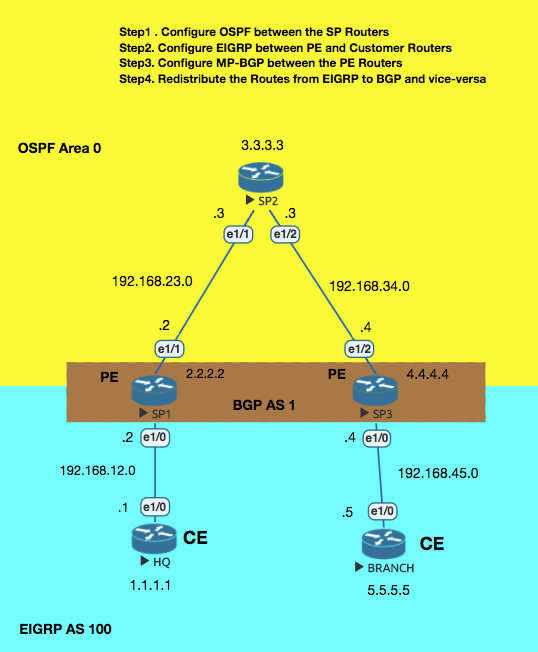
Step1. Configure OSPF between the SP Routers (SP and PE Routers)
SP2
interface Loopback0
 ip ospf network point-to-point
!
router ospf 1
 network 3.3.3.0 0.0.0.255 area 0
 network 192.168.23.0 0.0.0.255 area 0
 network 192.168.34.0 0.0.0.255 area 0
!
SP1
interface Loopback0
 ip ospf network point-to-point
!
router ospf 1
 network 2.2.2.0 0.0.0.255 area 0
 network 192.168.23.0 0.0.0.255 area 0
SP3
interface Loopback0
 ip ospf network point-to-point
!
router ospf 1
 network 4.4.4.0 0.0.0.255 area 0
 network 192.168.34.0 0.0.0.255 area 0
Step2. Setup MPLS neighborship between the SP routers.
SP2
interface Ethernet1/2
 mpls ip
!
mpls ldp router-id Loopback0
SP1
interface Ethernet1/1
 mpls ip
!
mpls ldp router-id Loopback0
SP3
interface Ethernet1/2
 mpls ip
!
mpls ldp router-id Loopback0
!
Step3. Create VRF on the PE routers for the CUSTOMER as there can be many customers connected to a PE Router.
SP1
ip vrf CUSTOMER
 rd 100:1
 route-target export 1:100
 route-target import 1:100
!
interface Ethernet1/0
 ip vrf forwarding CUSTOMER
SP3
ip vrf CUSTOMER
 rd 100:1
 route-target export 1:100
 route-target import 1:100
!
interface Ethernet1/0
  ip vrf forwarding CUSTOMER
Step4. Configure EIGRP between PE and Customer Routers and ensure that the neighborship (EIGRP) is formed.
SP1
router eigrp 100
 !
 address-family ipv4 vrf CUSTOMER
  network 192.168.12.0
  autonomous-system 100 // manually type
 exit-address-family
HQ
router eigrp 100
 network 1.0.0.0
 network 192.168.12.0
!
SP3
router eigrp 100
 !
 address-family ipv4 vrf CUSTOMER
  network 192.168.45.0
  autonomous-system 100 // manually type
 exit-address-family
BRANCH
!
router eigrp 100
 network 5.0.0.0
 network 192.168.45.0
!
Step5. Configure MP-BGP between the PE Routers (vpnv4) . There is no need to configure this on the SP2 router.
SP1
router bgp 1
 neighbor 4.4.4.4 remote-as 1
 neighbor 4.4.4.4 update-source Loopback0
 !
 address-family vpnv4
  neighbor 4.4.4.4 activate
  neighbor 4.4.4.4 send-community both
 exit-address-family
SP3
router bgp 1
 neighbor 2.2.2.2 remote-as 1
 neighbor 2.2.2.2 update-source Loopback0
 !
 address-family vpnv4
  neighbor 2.2.2.2 activate
  neighbor 2.2.2.2 send-community both
 exit-address-family
Step6. Redistribute the Routes from EIGRP to BGP and vice-versa
SP1
router eigrp 100
 !
 address-family ipv4 vrf CUSTOMER
  redistribute bgp 1 metric 1500 4000 200 10 1500
 exit-address-family
!
router bgp 1
 !
 address-family ipv4 vrf CUSTOMER
  redistribute eigrp 100
 exit-address-family
SP3
router eigrp 100
 !
 address-family ipv4 vrf CUSTOMER
  redistribute bgp 1 metric 1500 400 20 20 1500
 exit-address-family
!
 address-family ipv4 vrf CUSTOMER
  redistribute eigrp 100
 exit-address-family
hostname HQ
!
interface Loopback0
 ip address 1.1.1.1 255.255.255.0
 ip ospf network point-to-point
hostname BRANCH
!
interface Loopback0
 ip address 5.5.5.5 255.255.255.0
 ip ospf network point-to-point



Start the conversation